
Why are your ads getting lower Quality Scores even though your targeting is solid? The answer might be hiding in plain sight: your images are the wrong size, and the platforms are cropping them into oblivion.
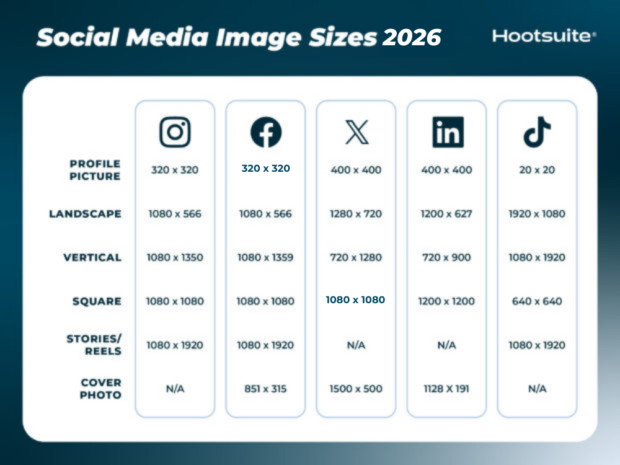
Hootsuite just updated their 2026 social media image size guide, and buried in those specs is a truth most advertisers miss. When your visual assets don’t match platform requirements, algorithms penalize you. Not with a warning. Just with worse performance and higher costs.
The 2026 Spec Shift Nobody Warned You About
Here’s what changed. Most networks still want 1080 pixels wide for feed content, but the aspect ratio game has completely flipped. Square images, the old standby at 1080 x 1080, now underperform on almost every platform. Vertical formats like 4:5 (1080 x 1350 on Instagram) and full 9:16 (1080 x 1920 for Stories and Reels) dominate mobile feeds.
Instagram displays everything with a vertical crop on your grid now, even if you upload landscape. Facebook kept its landscape option at 1080 x 566 but prioritizes Reels at 1080 x 1920. TikTok will accept square ads at 640 x 640, but good luck getting impressions when everyone else is running full vertical. LinkedIn still supports landscape at 1200 x 627, which makes sense given its desktop-heavy audience, but even there, vertical posts at 720 x 900 are gaining ground.
The pattern is clear: mobile-first platforms reward mobile-first dimensions. If your creative team is still exporting square assets by default, you’re fighting an uphill battle before the ad even loads.
Why Image Dimensions Impact How to Improve Google Ads Quality Score
Google Ads Quality Score gets calculated from expected click-through rate, ad relevance, and landing page experience. Most people focus on keywords and landing pages. Fair enough. But when you run Display campaigns, Demand Gen, or YouTube ads, your creative quality directly affects relevance signals.
Upload a 1200 x 628 image to a placement that expects 1080 x 1920, and Google either letterboxes it with ugly black bars or crops it unpredictably. Either way, your visual message gets mangled. Users scroll past. Your CTR drops. Google sees the low engagement and assumes your ad isn’t relevant. Your Quality Score takes a hit, your CPC goes up, and you blame the targeting when the real culprit was a file export setting.
We see this constantly with clients running cross-platform campaigns. They design one set of assets, push them everywhere, and wonder why Instagram outperforms YouTube or why Facebook traffic converts but Display doesn’t. The answer is usually format mismatch, not audience quality.
What Actually Works Right Now
If you want to stop losing money to dimension drift, here’s the playbook:
- Design for vertical first. Create your hero creative at 1080 x 1920, then adapt down to square or landscape versions. Mobile screens are vertical. Your ads should be too.
- Test native specs per platform. Don’t assume 1080 x 1080 works everywhere just because it’s easy. Instagram feed is 1080 x 1350. Facebook feed can be 1080 x 1359. Those 9 extra pixels matter when the algorithm is deciding whether to crop your CTA button.
- Use platform-specific ad tools. Google Ads has responsive display ads that auto-resize, but you still need to upload assets in the right base dimensions (1200 x 628 for landscape, 1200 x 1200 for square, 960 x 1200 for portrait). If you hand Google a 1080 x 1080 and tell it to fill a 960 x 1200 slot, you’re asking for trouble.
- Check your grid view. On Instagram, everything shows as vertical in the profile grid now, even if it was landscape in the feed. If you’re running brand campaigns where profile aesthetics matter, design with that vertical crop in mind from the start.
- Monitor creative fatigue faster. Mismatched dimensions accelerate fatigue because users are more likely to skip an ad that looks broken or poorly formatted. If your frequency is climbing but CTR is dropping after just a few days, check your creative specs before you blame the audience.
How to Improve Google Ads Quality Score With Better Creative Ops
Quality Score isn’t just about keywords. It’s about the entire user experience, and that includes whether your ad loads correctly and looks intentional. When you run Google Ads campaigns that span Display, YouTube, Discovery, and Demand Gen, you need a creative production process that accounts for format variation.
Start by building a spec sheet. List every placement type you use and its ideal dimensions. For Google Display, that’s 1200 x 628 landscape, 300 x 600 skyscraper, 1200 x 1200 square, and 960 x 1200 portrait. For YouTube, it’s 1920 x 1080 for standard video ads but 1080 x 1920 if you’re running Shorts. For Discovery and Demand Gen, it’s 1200 x 628 landscape, 1200 x 1200 square, and 960 x 1200 portrait again.
Then, design each asset natively. No stretching, no cropping in-platform. If you’re using tools like Canva or Figma, create separate artboards for each size. Yes, it takes longer. But the performance gap between a native-sized ad and a stretched one can easily be 20-30% on CTR, which compounds into better Quality Scores and lower CPCs over time.
Run A/B tests on format, not just messaging. We tested this with a client running Demand Gen campaigns: same offer, same audience, same landing page, but one set of ads used 1200 x 628 landscape and the other used 960 x 1200 portrait. The portrait ads had 18% higher CTR and a 12% better conversion rate, which translated to a Quality Score bump from 6 to 8 within two weeks. That score increase dropped their CPC by $0.40. Over a $10k/month budget, that’s real money.
The Local Angle: Why LA Brands Can’t Ignore This
If you’re running ads for a business in Los Angeles or Glendale, you’re competing in one of the most expensive digital markets in the country. Every wasted impression costs more here than it would in Kansas City. When your creative doesn’t match platform specs, you’re essentially paying premium CPCs for subpar delivery.
Local service businesses, restaurants, and retail brands often run the same creative across Instagram, Facebook, and Google Display without adjusting dimensions. That works okay on Facebook, where the platform is more forgiving. But on Google Display and Instagram, where mobile dominates and the algorithm is less tolerant, it kills performance.
We work with clients in Glendale who run social media campaigns and Google Ads side by side. The ones who adapt creative per platform see 25-40% better ROAS than the ones who don’t. It’s not because they have better offers or smarter targeting. It’s because their ads don’t look broken on mobile.
Sources
Social media image sizes for all networks [April 2026], Hootsuite
